General Contracting
|
Change scheduled target dates |
|
|
General Contracting
|
|
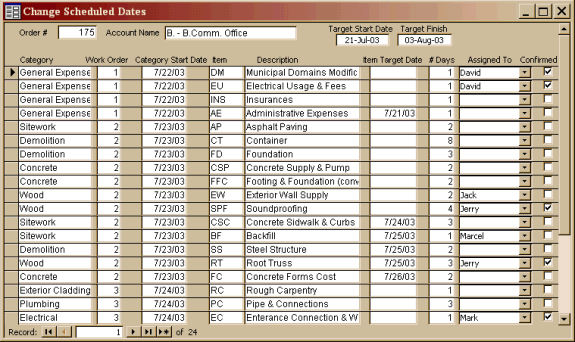
Should a conflict between work schedules arise, this window will allow you to change target dates, work assignments, the estimated # of days needed, etc.
|
|
| If you want to concentrate on one category of work, you can filter for that
category by pointing to the desired category, clicking the right mouse button, then
choosing the "Filter by selection" button. When done, point to
the area a second time, click the right mouse button, and choose "Remove filter
sort".
All changes made here will be reflected the next time you run the PERT report. |
 |
|
|
Print
our Information Package about this program. This manual requires |
Links |
| For more on the Construction
Industry, please visit All of Construction AllOfConstruction.com is all about construction - construction articles, news, resources.... |

|
Have a problem and can't find the answer on our site? Contact us at help@ ercomputers.com. |
Looking for a way to help
organizing your affairs? |
|
Can we help you professionally? |
Want to know what people say about
us? |
|
Thanks
for visiting |
||
 |
|
 |
|
|
 |
|
|
|
 |
|
|
|
||
|
These links will lead you into our framed
website. It is best viewed at a screen resolution
of 1024 x 768 dpi, however, 800 x 600 dpi
will also work. |
||