General Contracting
|
Customer Maintenance |

|
General Contracting
|
|
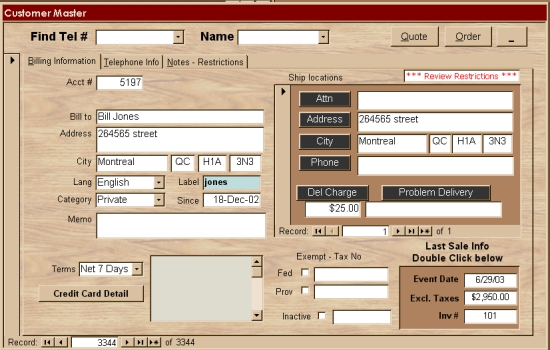
Customer information is stored in this screen.
|
When Quotes, Orders, Production Reports are created, customer information (such as Restrictions) is automatically retrieved. In the following example, there are
active links for the following buttons and areas: |
|
|
| Credit Card information is password protected. Choose the 'Credit Card Detail' button to see an example. |
| Find Account Name | |
|
Our philosophy, when designing a database is "least amount of
keystrokes". Because of this we use choice lists extensively.
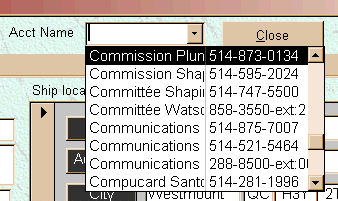
For example, when you want to find a customer and don't know their Account
number, you would use the search drop down list.
Once you start typing, the field automatically tries to match what you are typing to one of the names in the database. When the right name fills in, just hit the Enter key on your keyboard. |
|
| Customer History | |
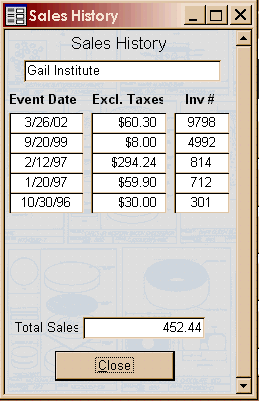 |
Knowing your customer history immediately can have great
benefit.
This screen shows a summary of your customer history. At a glance, you can immediately see their ordering patterns. Should you need to know more detail about an individual sale, a double click on any of the detail fields will open the corresponding invoice.
|
Print our Information Package about this program
 to download your free copy.
 |
|

|
Have a problem and can't find the answer on our site? Contact us at help@ ercomputers.com. |
Looking for a way to help
organizing your affairs? |
|
Can we help you professionally? |
Want to know what people say about
us? |
|
Thanks
for visiting |
||
 |
|
 |
|
|
 |
|
|
|
 |
|
|
|
||
|
These links will lead you into our framed
website. It is best viewed at a screen resolution
of 1024 x 768 dpi, however, 800 x 600
dpi will also work. |
||