General Contracting
|
Quote Entry Screen - Page 2 |

|
General Contracting
|
|
"Planning your time and visualizing the projects,
helps you make the most of your day."
|
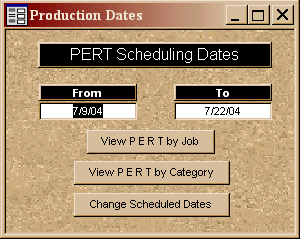
The PERT shows the Current date in the From field, and the To field is automatically set to 13 days
in the future.
If you change the From date, then the program will automatically calculated the closing date. The calculated closing date can be overridden. |
|
| Once you are satisfied with the date range, then print the Pert Report, either by Job or by Category. | |
| If the report indicates conflict(s), choose the Change Scheduled Dates button. Input the order number that needs to be changed and that order will be displayed for modification.. | |
 |
 |
 |
Print
our Information Package about this program
 to Print you free copy.

|
Have a problem and can't find the answer on our site? Contact us at help@ ercomputers.com. |
Looking for a way to help
organizing your affairs? |
|
Can we help you professionally? |
Want to know what people say about
us? |
|
Thanks
for visiting |
||
 |
|
 |
|
|
 |
|
|
|
 |
|
|
|
||
|
These links will lead you into our framed
website. It is best viewed at a screen resolution
of 1024 x 768 dpi, however, 800 x 600 dpi
will also work. |
||