|
|
|
|
|
|
|
|
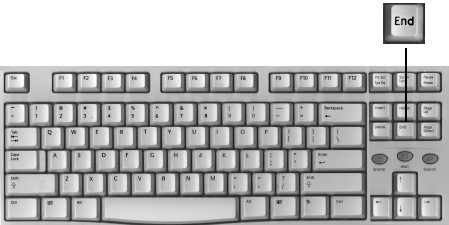
| Description | HOLD | TAP | |
|
The End key used by itself causes the cursor to move to the last available position of the line your cursor is on. |
|
||
|
If you use it in conjunction with the Control key, your cursor will move to the end of your document. |

|
|
|
| When Shift is used, again the cursor will move to the right but the text will be selected. |

|

|
|
|
Needless to say, when control and shift are used with End, your cursor will move from it's position to the end of document and everything in between will be selected. |
&
|
|

|
Have a problem and can't
find the answer on our site?
Click Here To
Contact Us. |
|
Want to know what people say about us? Visit our Comments page. |
|
Let us know what you think about our site or want
to offer any suggestions. |
|
Thanks for visiting |
||
 |
|
 |
|
|
 |
|
|
|
 |
|
|
|
||
|
These links will lead you into our
framed website. It is best viewed at a screen
resolution of 1024 x 768
dpi, however, 800 x 600 dpi will
also work. |
||