Import/Export
Pre-pack functionality
|
Style
Screen -,
Page 1 |
|
|
|
Import/Export
|
|
|
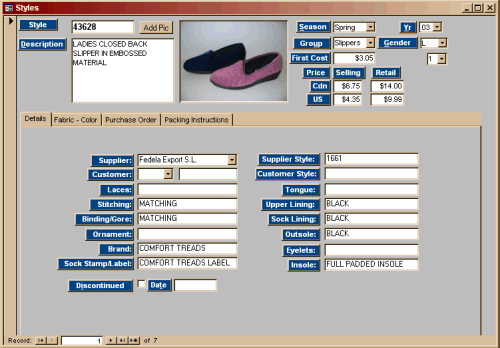
The Style screen is divided into 4 sections: Details, Fabric-Color, Purchase
Order and Packaging Instructions.
Images are Added by choosing the 'Add Pic' button. To use this feature, Photos/Sketches are filed on your hard drive in an Images folders divided by Season/Year. |
|
|
|
The details shown above can be easily added to, should other information be needed. |
 |
 |
 |

Our Basic area is a non-profit entity of ER
Computers.
If it has helped you, why not consider helping us by
making a small donation to insure it's survival.
Without your support, we
simply would not exist.
Thank you in advance for your assistance.
|
Have a problem and can't find the answer on our site? Contact us at help@ ercomputers.com. |
Check out our newest project |
|
Can we help you professionally? |
Want to know what people say about
us? |
|
Let us know what you think about our site or want to
offer any suggestions. |
|
|
Thanks for visiting |
||
 |
|
 |
|
|
 |
|
|
|
 |
|
|
|
||
|
These links will lead you into our framed
website. It is best viewed at a screen resolution
of 1024 x 768 dpi, however, 800 x 600 dpi will also work. |
||
|
Have a problem and can't find
the answer on our site?
Click Here To Contact
Us. |
|
Want to know what people say about us? Visit our Comments page. |
|
Let us know what you think about our site or want to
offer any suggestions. |
|
Thanks
for visiting |
||
|
|
|
|
|
|
|
|
|
|
|
|
|
|
||
|
These links will lead you into our
framed website. It is best viewed at a screen
resolution of 1024 x 768
dpi, however, 800 x 600 dpi will
also work. |
||
|
Have a problem and can't find
the answer on our site?
Click Here To Contact
Us. |
|
Want to know what people say about us? Visit our Comments page. |
|
Let us know what you think about our site or want to
offer any suggestions. |
|
Thanks
for visiting |
||
|
|
|
|
|
|
|
|
|
|
|
|
|
|
||
|
These links will lead you into our
framed website. It is best viewed at a screen
resolution of 1024 x 768
dpi, however, 800 x 600 dpi will
also work. |
||
|
Have a problem and can't find
the answer on our site?
Click Here To Contact
Us. |
|
Want to know what people say about us? Visit our Comments page. |
|
Let us know what you think about our site or want to
offer any suggestions. |
|
Thanks
for visiting |
||
|
|
|
|
|
|
|
|
|
|
|
|
|
|
||
|
These links will lead you into our
framed website. It is best viewed at a screen
resolution of 1024 x 768
dpi, however, 800 x 600 dpi will
also work. |
||
|
Have a problem and can't find
the answer on our site?
Click Here To Contact
Us. |
|
Want to know what people say about us? Visit our Comments page. |
|
Let us know what you think about our site or want to
offer any suggestions. |
|
Thanks
for visiting |
||
|
|
|
|
|
|
|
|
|
|
|
|
|
|
||
|
These links will lead you into our
framed website. It is best viewed at a screen
resolution of 1024 x 768
dpi, however, 800 x 600 dpi will
also work. |
||
|
|