|
|
|---|
|
|
|
 ER Computers
 |
||||||||||||||||||||||||||||||||||||
| Basics | ||||||||||||||||||||||||||||||||||||
|
||||||||||||||||||||||||||||||||||||
| Common Problems | ||||||||||||||||||||||||||||||||||||
|
||||||||||||||||||||||||||||||||||||
| Software Help | ||||||||||||||||||||||||||||||||||||
|
|
|
|
|
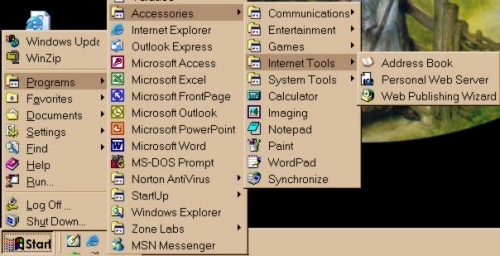
You find the Accessories folder
by pointing to and single clicking on the Wait a second or two until the menu opens. Now slide your mouse up to Programs. Again wait, when the menu opens, locate Accessories, then slide your mouse pointer to it. If you would like to know more about each option under this folder, using the diagram above, slide your mouse to the desired Internet Tool subject, then single click. |
| Microsoft Personal Web Server (PWS) 4.0 is a desktop Web server. If you are connected to an intranet, or a corporate network, you can share documents with your coworkers from your own computer. Use PWS to develop and publish your personal home page. You can also test your Web site before you upload it to an Internet service provider. |
| The Web Publishing Wizard is design to help you upload your web pages to your internet Web Hosting |

|
Have a problem and can't
find the answer on our site?
Click Here To
Contact Us. |
|
Want to know what people say about us? Visit our Comments page. |
|
Let us know what you think about our site or want
to offer any suggestions. |
|
Thanks for visiting |
||
 |
|
 |
|
|
 |
|
|
|
 |
|
|
|
||
|
These links will lead you into our
framed website. It is best viewed at a screen
resolution of 1024 x 768
dpi, however, 800 x 600 dpi will
also work. |
||





 button located on the bottom left of your screen.