|
Downloading files and programs |
|
|
|
|
|
Downloading files and programs off the internet is
becoming one of the most common things we do. The process is
usually simple and described below.
When you download a file, you are placing a copy of it on your hard drive. Files can be of different sizes and types. You would download programs for specific reasons. When the download is finished, you must install it. The concept is no different than when you receive a package through the mail. You first receive it, then you open it and put the objects away. That is what we do when we download files, we receive them, then open them and put the components of the program away. The only difference is that we don't perform the physical action. Example: Some other common programs that are readily available from the internet would be Acrobat Reader, Winzip, Imesh, the Internet Explorer and many more. Each program is design to do a specific task, but all programs require installation before you are able to use them. You usually start by visiting a web site. If the website offers a download, you deal with the file as follows. For example, you could visit Microsoft and browse through the multitude of programs. Our instructions are based on the default Windows download program. If you have loaded a different program to handle your downloads (Go!Zilla or Real Download are very popular ones) the instructions are similar, but the windows will be different. |
|
|
Download Instructions: (3 steps) |
|
|
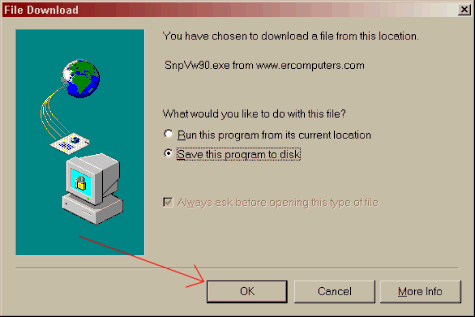
Once you choose the download link, wait a few seconds, a File Download dialog box will open. Make sure there is a black dot beside 'Save his program to Disk'. You could choose to run the program from it's locations, but it is usually a good idea to save a copy so you can easily reload the program if necessary.
Click on the OK button. |
|
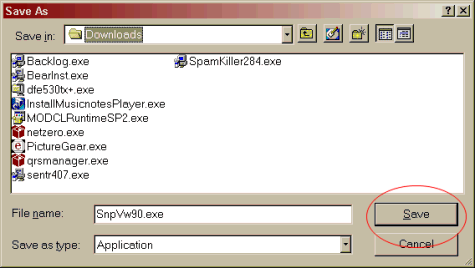
| A "Save as" box will open.
Notice that a file named 'SnpVw90.exe' is going to be downloaded. Your computer should already be set to place this file in your download folder.
Choose the Save button. |
|
|
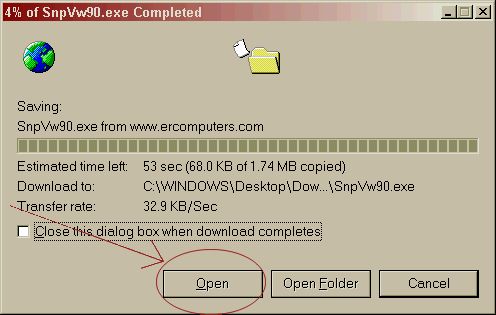
The time required to download files is determined by your connection type. High Speed connections cut the time considerable. What takes 3/4 hour on dial-up connections can be accomplished in less than 5 minutes with high speed. Once the file is downloaded, the Open button will become available. Just click on it. The file will start the installation of Snap Shot Viewer on to your hard drive.
|
|
|
Installing Snapshot Viewer (6 steps) |
|
|
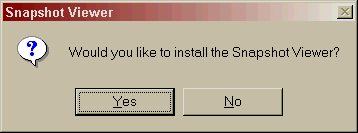
After you choose the 'Open' button, you will be asked to confirm the start of the installation. Choose the 'Yes" button. |
|
|
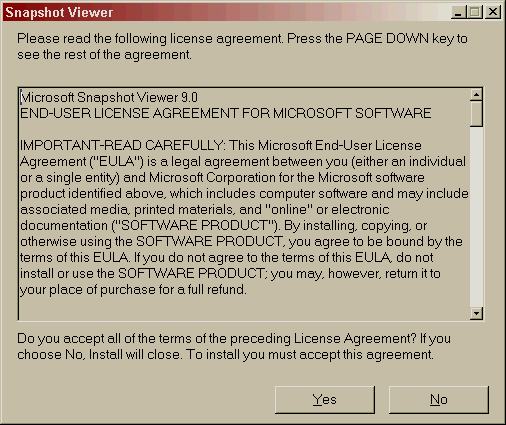
The next screen will be the license agreement. All programs have
license agreements. You will not be able to use any program unless
you agree. If you say no, the installation will stop. Choose the 'Yes' button.
|
|
|
When you have accepted to the license
agreement, the following
screen will appear. 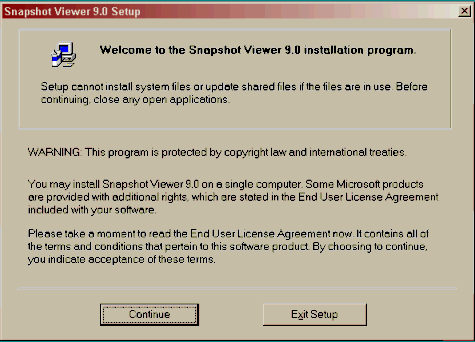
|
|
|
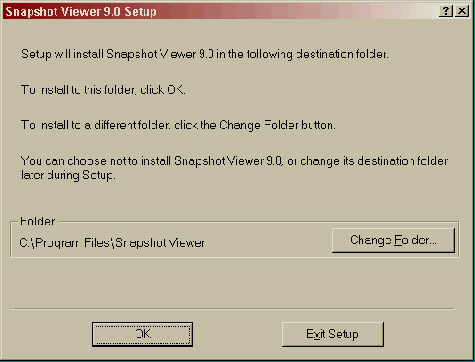
The next screen will ask you where you want the program
installed. |
|
|
The installation will begin with this first screen.
|
Choose the large Install button.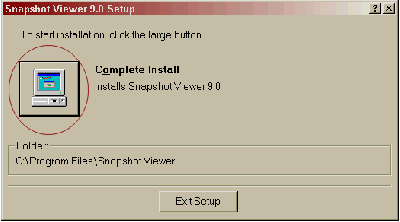
|
|
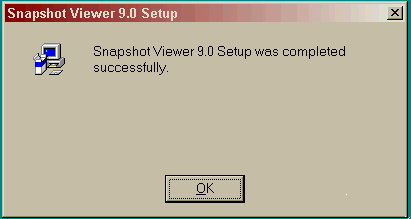
The installation will only take a few seconds. When it is complete, choose the 'OK' button again. You would now ready to view and print files that end in .snp extensions. |
|
|
The preceding was only an example of downloading. Not all downloads and installations are exactly the same, but all use the same philosophy in their construction. The words might change, but the essence is universal. Now, go out and download. The only last piece of advice we can offer, would be to make sure your Antivirus software is up to date. You never know where a virus lurks and we would hate to hear you downloaded a virus. |

|
Have a problem and can't
find the answer on our site?
Click Here To
Contact Us. |
|
Want to know what people say about us? Visit our Comments page. |
|
Let us know what you think about our site or want
to offer any suggestions. |
|
Thanks for visiting |
||
 |
|
 |
|
|
 |
|
|
|
 |
|
|
|
||
|
These links will lead you into our
framed website. It is best viewed at a screen
resolution of 1024 x 768
dpi, however, 800 x 600 dpi will
also work. |
||