|
|
|
|
|
|
| default | A predefined setting. For example, most programs use an 8½" x 11" piece of paper as the default paper size setting. | ||||
|
defrag
defragment defragmentation |
The process of rewriting a file to adjacent sections of a hard disk.
Meaning: Over time, parts of the same file can become fragmented--that is, spread over different areas on a hard disk. Fragmented files causes slower disk speed and can contribute to crashes. Windows (all versions) includes the Disk Defragmenter, which may help improve disk performance. See also file allocation table. | ||||
| desktop | Your workspace on the computer screen. See also Active Desktop. | ||||
| dialog box | A window in which you provide information to a program. | ||||
|
Dial-Up
Networking | A feature that allows you to use a phone line and modem to connect to other computers. | ||||
|
Directory Directories | Old terminology for a location where you store files and other directories. Currently we refer to these areas as folder(s). | ||||
| disk drive | A physical piece of hardware on which you store files. Drives are assigned a letter. For example, most users store their files on their hard disk, which is typically labeled "C". | ||||
| document | A file you create when you save your work in a program. Examples of documents include word-processing files, spreadsheets, and bitmaps. | ||||
| domain | A group of networked computers that share information and resources. | ||||
| DOS |
Initial operating system for pc's. Rarely used in today's
technology. Operating systems are loaded in DOS mode. Windows was based on
DOS.
Some games still run in DOS mode. Windows has included a DOS mode feature, which allows you to open DOS sessions. |
||||
| DNS |
Domain Name Server address. A series of 12 numbers assigned to internet
service providers. Similar to any street address, except they are
represented with just numbers.
For example, our web site's server's DNS address is 140.186.45.23 |
||||
| download |
To copy files from one computer to your own by using a modem or a network connection. For example, you download files from the Web to your hard disk.
Once a file has been downloaded, if it is a program, it must be setup. Click here to learn more about downloads |
||||
| DPI | Dots Per Inch. The term used to describe a computer screen resolution. The higher the DPI, the more surface area you have to work with. | ||||
| driver | Software that the operating system uses to control a specific piece of hardware. For example, before you can use a printer, you must first tell the computer it has the printer by loading the printer's drivers. | ||||
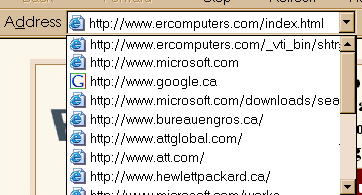
| drop down lists/menus |
Drop down lists are extremely useful. They allow a user to type
less. This feature stores either, choice lists, or your past entries
Although the example above is using the Internet Explorer address bar as a base, the philosophy is the same in all programs. Drop down lists/menus are represented by any of the following icons.
| ||||
| DVD | A high-capacity compact disc. This disc can store enough data for a full-length movie. You must have a DVD disc drive or player to use DVD discs. | ||||
| Electronic messages sent from one person to another over the Internet or a network. E-mail can contain both text and files. | |||||
| EDI | Electronic Data Interchange. A method of doing business where companies send Purchase orders, Invoices, etc. across the internet to their Trading Partner (customer). | ||||
| Explorer Bar | A pane that opens on the left side of windows, such as when you click the Search button or Favorites button. | ||||
 |
 |
 |

|
Have a problem and can't
find the answer on our site?
Click Here To
Contact Us. |
|
Want to know what people say about us? Visit our Comments page. |
|
Let us know what you think about our site or want
to offer any suggestions. |
|
Thanks for visiting |
||
 |
|
 |
|
|
 |
|
|
|
 |
|
|
|
||
|
These links will lead you into our
framed website. It is best viewed at a screen
resolution of 1024 x 768
dpi, however, 800 x 600 dpi will
also work. |
||