Eyewear Management
|
Booking Appointments |

|
Eyewear Management
|
|
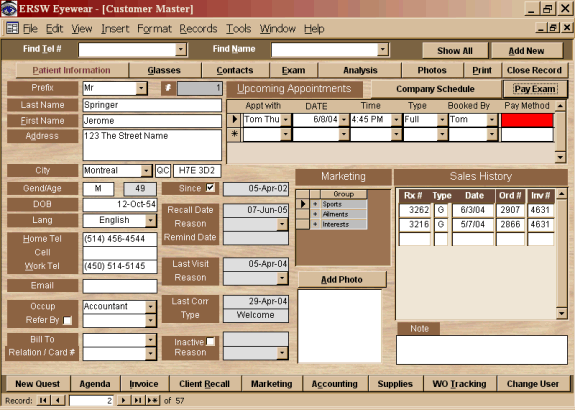
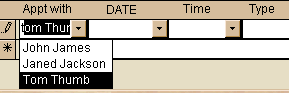
| To set an appointment, first choose who the
appointment is for.
Once selected, the calendar will list the upcoming days, showing the individual's availability. |
 |
|
Choose an available date from the list. |
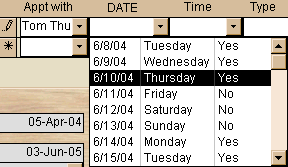 |
| Once the date is chosen, the time field will filter any booked appointments and only list the open time slots. | 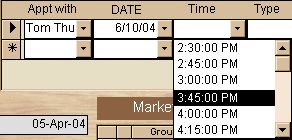 |
| When the type of exam is chosen, the 'Booked by' field is automatically input with the logged on user's name.. | 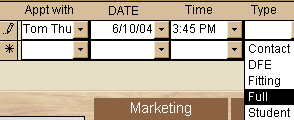 |
|
The Pay Method field remains red until the Exam Payment
is posted. |
|
|
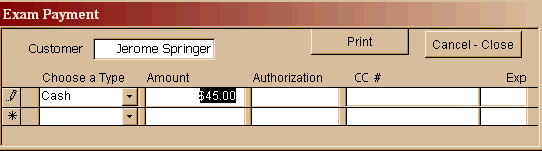
To register an Exam Payment, choose the "Pay Exam"
button. When you choose the Payment Type, the amount due is
input. If the customer is paying the amount in one payment, hit
the tab key, enter an authorization #. If you choose, you can
enter the credit card information. The Print button will produce a
Client receipt in triplicate.
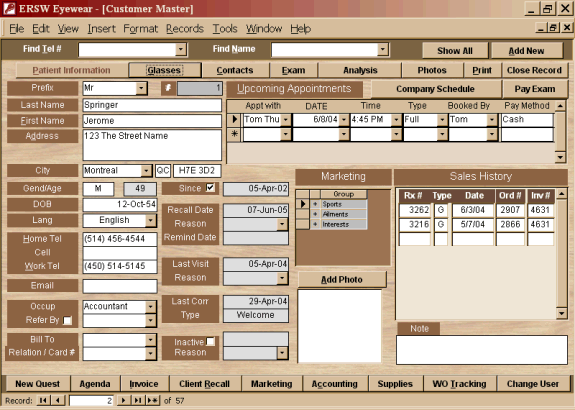
When you finish and close the payment screen, the transaction will be recorded in the customer appointment screen. The Red alarm will be replaced with the payment type. Should a client split a payment, the field would read "Split". |
|
|
|
|
 |
 |
 |
Print our Information Package about this program.
Adobe Acrobat
Reader and WinZip are required.
If you do not have this program on your computer,
please choose a link below
to download your free copy.
|
|
|

|
Have a problem and can't find the answer on our site? Contact us at help@ ercomputers.com. |
Looking for a way to help
organizing your affairs? |
|
Can we help you professionally? |
Want to know what people say about
us? |
|
Thanks
for visiting |
||
 |
|
 |
|
|
 |
|
|
|
 |
|
|
|
||
|
These links will lead you into our framed
website. It is best viewed at a screen resolution
of 1024 x 768 dpi, however, 800 x 600 dpi
will also work. |
||
Current Awards (2004)