| 1 |
| 2 |
| 3 |
| 4 |
| 5 |
| 6 |
| 7 |
| 8 |
| 9 |
| 10 |
| 11 |
| 12 |
| 13 |
| 14 |
| 15 |
| 16 |
| 17 |
| 18 |
click on either the rolling ball or rotating arrow
|
|
|
||||||||||||||||||
|
click on either the rolling ball or rotating arrow |
||||||||||||||||||||
|
#
|
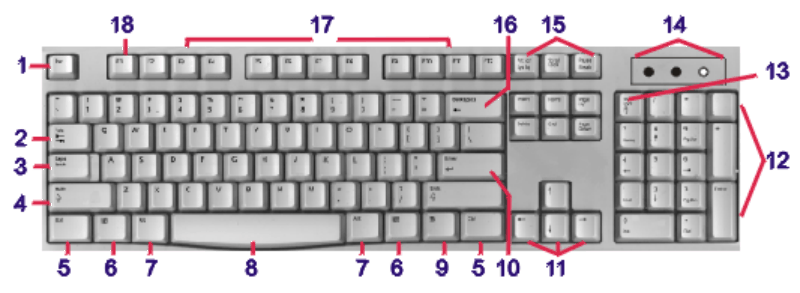
Name | Description- For a better view of location, choose the linked name buttons | |
|
1
|
Escape
 |
 |
Most often used to cancel commands, (menu and dialog box) |
|
2
|
Tab
 |
 |
Primarily used to insert distance between text. It is also used as a movement key within Tables and Dialog boxes. |
|
3
|
Cap Locks | |
When this key is activated (tapped) the "Caps Lock" light goes on (10) and all the alphabet keys are typed in UPPER CASE. When active, if you hold the Shift key and tap a letter, the letter will be typed in lower case. |
|
4
|
Shift
 |
|
Modifier keys. 2 keys, one for each hand.
Primarily used to Capitalize words. |
| Can be used in conjunction with the other modifier keys (Ctrl and Alt) to activate short cut commands or menu bar options in programs. | |||
| When used with arrow keys (11), the selecting feature is activated. Selecting text is necessary prior to making changes (i.e. Bold, Italic, etc.) | |||
|
5
|
Control
 |
|
Modifier keys. 2 keys, one
for each hand.
Primarily used to activate specific shortcut commands in programs. Shortcut commands are the most efficient method of operating a computer. Shortcut combinations in different programs vary slightly. There are a great many shortcuts that have become universal in most programs. Taking the time to memorize the most common shortcuts can save you a considerable amount of time. |
| 6 |  |
|
Provides access to you start menu, an alternative to mousing. |
|
7
|
Alt
 |
|
Modifier keys. 2 keys, one for each hand.
Primarily used to access commands listed in the menu bar. |
|
8
|
Space bar
 |
|
Used to insert space in between words. A computer knows when a word ends by its space. This key should not be used to insert distances between words. When a large amount of space is need, the Tab key should be used. |
| 9 | Pop-up
menu key |
|
Keyboard access to pop-up menus. Used when your mouse crashes. |
| 10 | Enter
 |
|
In Windows: Command key, when an icon
is selected, instead of double clicking with your mouse, hitting the enter
key will open the program .
In Word Processors: Forces a new line of text In Spreadsheets: Accepts the information in a cell |
|
11
|
Arrow keys
 
  |
|
Movement keys. Used to move the insertion point (cursor) inside documents. Left - Right - Up - Down |
| When used ... | |||
| Alone,
the insertion point is moved one character
or line. |
|||
| With the
Ctrl
key, the insertion point is moved one
word or paragraph. |
|||
| With the
Shift
key, the selecting tool is activated,
selecting characters or lines as you move. |
|||
| With both
the Ctrl and Shift. You will be
selecting words or paragraphs as you move. |
|||
|
12
|
Numeric
Key Pad |
|
There are two modes that this key pad can be
set to.
Active only if the Num Locks key (11) is tapped. The Num Locks light should be on when active (10). When the light is off, this key pad is a duplicate of the arrow keys and react the same as described in 8 above. Special note should be taken of the * / - + keys as they are mathematical symbols. |
| * multiplication / division - subtraction + addition | |||
|
13
|
Num lock | |
When tapped the numeric keypad is activated. The keys are numbers. This is designed for easier insertion of numbers. |
|
14
|
Activity panel | |
Indicates when different keyboard features are on or off. |
|
15
|
Insert
 |
|
When pressed, the computer is placed into TYPEOVER mode. The computer's normal state is in INSERT mode, meaning: if the cursor is placed between two words and a third is typed, the word to the right of the cursor is pushed to the right as the new word is typed. TYPEOVER mode causes existing words to be removed as new words are typed. To return to INSERT mode tap this key a second time. |
Delete
 |
Erases characters to the right of the cursor | ||
Home
 |
Causes the cursor to move to the left hand margin | ||
End
 |
Causes the cursor to move to the right hand margin | ||
Page Up
 |
Causes the cursor to move to the top of the screen | ||
Page Down
 |
Causes the cursor to move to the bottom of the screen. | ||
|
16
|
Backspace
 |
|
Erases the character to the left of the cursor |
|
17
|
Function keys | |
Used to initiate various commands (shortcuts) in programs. The commands vary in programs. They can also be used in conjunction with modifier keys to perform the even more function. |
|
18
|
F1 | |
Universal Help access key. When this key is pressed in any program, the help screen will open for that program. |

|
Have a problem and can't
find the answer on our site?
Click Here To
Contact Us. |
|
Want to know what people say about us? Visit our Comments page. |
|
Let us know what you think about our site or want
to offer any suggestions. |
|
Thanks for visiting |
||
 |
|
 |
|
|
 |
|
|
|
 |
|
|
|
||
|
These links will lead you into our
framed website. It is best viewed at a screen
resolution of 1024 x 768
dpi, however, 800 x 600 dpi will
also work. |
||